Github Next & Github Copilot - CLI / APP
参考 GitHub Copilot & OpenAI Codex & AI-Coding & Text-to-Code: SQL > Script > DSL 2022-2025
对标 ANTHROPC - Claude Code & Agent SDK & OpenAI Codex CLI/APP & AGENTS.md & Agents SDK / AgentKit Google - AI Studio & Gemini CLI > AntiGravity & A2UI;
GitHub Next investigates the future of software development. > Agent 务必利用已有的 Github 基础设施(使用 Github 命令)
Agentic Workflows - Towards Natural‑Language Programming for GitHub Actions
Project Copernicus - Exploring LLM-powered navigation for your codebase
GitHub Spark - Can we enable anyone to create or adapt software for themselves, using AI and a fully-managed runtime?
Copilot Workspace - A Copilot-native dev environment, designed for everyday tasks.
Github Codespaces - Secure development made simple - GitHub Codespaces gets you up and coding faster with fully configured, secure cloud development environments native to GitHub.
Github Actions - Automate your workflow from idea to production - GitHub Actions makes it easy to automate all your software workflows, now with world-class CI/CD. Build, test, and deploy your code right from GitHub. Make code reviews, branch management, and issue triaging work the way you want.
Github Copilot CLI - Your terminal's new sidekick - GitHub Copilot CLI reads, writes, and runs code where you work. Code faster, smarter, together. > 20251013 部署调试 Github Copilot CLI Windows 版(Node 环境),Github 账号登录,并关联 Mobile;
- github / copilot-cli: GitHub Copilot CLI brings the power of Copilot coding agent directly to your terminal.
- github / awesome-copilot: Community-contributed instructions, prompts, and configurations to help you make the most of GitHub Copilot.
GitHub Copilot app - From issue to merge, in one app - The GitHub Copilot app is the only desktop experience for agent-driven development built natively on GitHub. Available for customers on paid GitHub Copilot plans for macOS, Windows, and Linux. > 20260703 部署调试 Github Copilot APP Windows 版,Github 账号登录,对标 OpenAI Codex CLI/APP & AGENTS.md & Agents SDK / AgentKit;
20260112 启用 Chat: Use Agent Skills,兼容 Claude Code 的 Agent Skills;
0204 Pick your agent: Use Claude and Codex on Agent HQ - Claude by Anthropic and OpenAI Codex are now available in public preview on GitHub and VS Code with a Copilot Pro+ or Copilot Enterprise subscription. Here's what you need to know and how to get started today.
0520 版本 1.120.0 包括“在智能体中打开”,应对 OpenAI Codex CLI/APP & AGENTS.md & Agents SDK / AgentKit的 Agent 一体化;
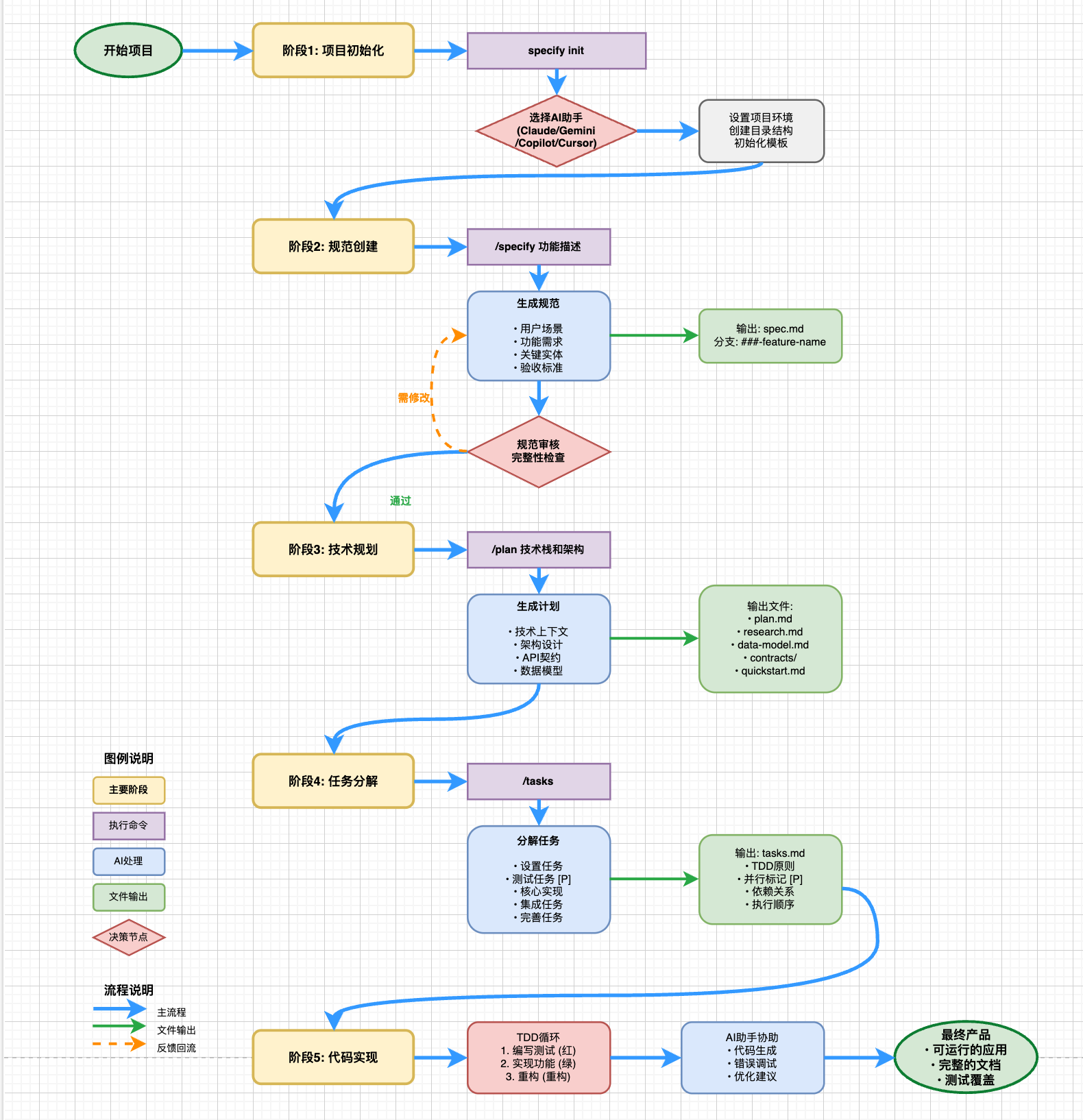
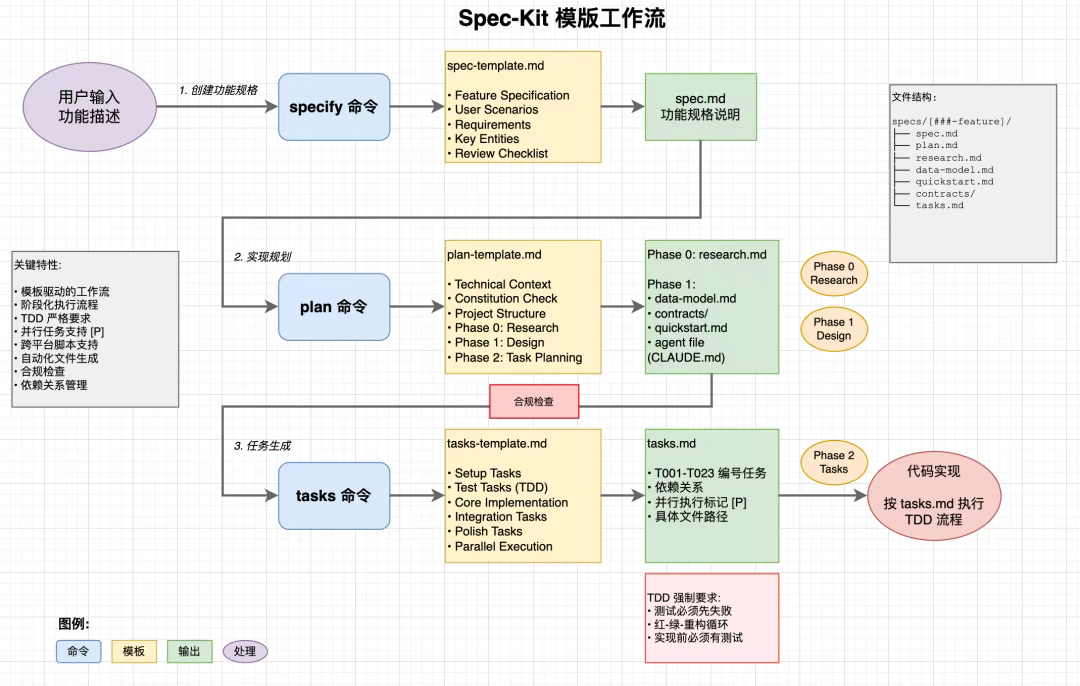
- github / spec-kit: 💫 Toolkit to help you get started with Spec-Driven Development > 参考 Specification-Driven Development(SDD) & Spec-Coding,配合 ANTHROPC - Claude Code & Agent SDK & Google - AI Studio & Gemini CLI > AntiGravity & A2UI 等;
20250902 Spec-driven development with AI: Get started with a new open source toolkit - Developers can use their AI tool of choice for spec-driven development with this open source toolkit. > 使用 SDD 中的 Markdown 作为 AI 构建的中的编程语言
- wham / github-brain: An experimental MCP server that summarizes GitHub discussions, issues, and pull requests using a fast local database.
20260104 调试 Spec Coding 研发范式应用(spec-kit、BMAD-METHOD、OpenSpec)& Holon - Holon - Run Agents. Get Patches. Ship PRs.
20251013 部署调试 Github Copilot CLI Windows 版(Node 环境)> 1023 结合调试 github / spec-kit,GithubCopilotCLIWorkSpace\spec-kit-demo:另有 Google - AI Studio & Gemini CLI > AntiGravity & A2UI,GeminiCLIWorkSpace\spec-kit-demo;
0)Github 账号登录,并关联 Mobile;同 VS Code 中 Github Copilot 使用计划,默认使用 Claude Sonnet 4.5; > 配置 .copilot/config.json;
1)使用 Git Bash 持久化安装 Specify CLI,init 项目 spec-kit-demo 后 check(或在已有项目下 init . 参考 2024科研 心理咨询 with ML-DL & LLM 研究框架 & 周志华:机器学习(西瓜书)& 李航:统计学习方法 & 俞勇:动手学机器学习/强化学习/计算机视觉 > 模式识别 & 数据挖掘):AI assistant 为 Github Copilot(暂无 Github Copilot CLI)& Gemini CLI & Cursor,script type 为 PS/Bash;下载相应模版构建项目结构:
.cursor/commands:存放命令触发型 MD 文件,在 Github Copilot / Gemini CLI / Cursor 中输入 “/” 即可调用
.specify/templates:对应命令的 Prompt 模板,控制 AI 生成逻辑
.specify/memory/constitution.md:项目 “宪法”,定义开发准则、代码规范等约束
.specify/scripts/bash 或 powershell:辅助开发的 Bash/PS 脚本,简化自动化流程、保证执行一致性
2)在 Github Copilot(VS Code,注意不是 Github Copilot CLI)& Gemini CLI & Cursor 中可使用相关命令 /speckit.*:示例参考 GoLang & GoGeo
/speckit.constitution 制定以代码质量、测试标准、用户体验一致性和性能要求为核心的原则
/speckit.specify 生成一个城市综合能力点评系统,包括创建城市并上传图片的功能,点评城市的交通规划、下水系统的功能,点评城市的美食、人文、建筑、生态环境保护等功能,并在各类管理中支持增删改查功能
/speckit.clarify - AI assistant 会通过交互澄清疑问并更新,生成 spec.md 文件
/speckit.plan 使用 antdesign 作为前端,go 作为后端。尽可能减少库的使用。尽可能使用原生 HTML、CSS 和 JavaScript。图片不会上传到任何地方,元数据存储在本地 SQLite 数据库中。
/speckit.tasks - AI assistant 根据之前生产的文档,自动拆解成可执行的具体任务
/speckit.analyze - AI assistant 自动检查前面生成的文档是否一致、有无遗漏或冲突,无需手动逐行核对,发现问题会自动修复
/speckit.implement - AI assistant 按任务清单逐步生成代码
2.1)参考 Core Philosophy:相较 Cursor 的 Plan Mode 以及 Kiro,前期生成大量的 Markdown 文档(消耗大量 Token);> spec-kit 是针对多人协作项目,需要详细的文档留痕、新人交接快速上手、 不同角色各取所需(产品看 spec,开发看 plan);可仅保留 constitution.md & spec.md & plan.md;
1128 部署调试 Fission-AI / OpenSpec,对比 github / spec-kit,同 GithubCopilotCLIWorkSpace\spec-kit-demo:
1)全局安装 OpenSpec CLI(后续 openspec update 更新),init 项目:AI assistants 为 Github Copilot;opensec 目录下的 AGENTS.md & project.md;